How to inspect an XML tree and its attributes online
The KitLumi XML Tree Viewer turns XML into a collapsible hierarchy so you can inspect nested values without following a long line of markup. Choose XML → collapsible tree for browsing or XML → JSON for copyable output. Processing takes place in the current browser tab.
How do you do it?
- Paste an XML document or select a local XML file in the tool.
- Choose XML → collapsible tree and select Run. Expand a branch to inspect its child values.
- Choose XML → JSON when you need a text representation to copy or download. Keep the original XML for exact markup review.
How are XML attributes and repeated elements displayed?
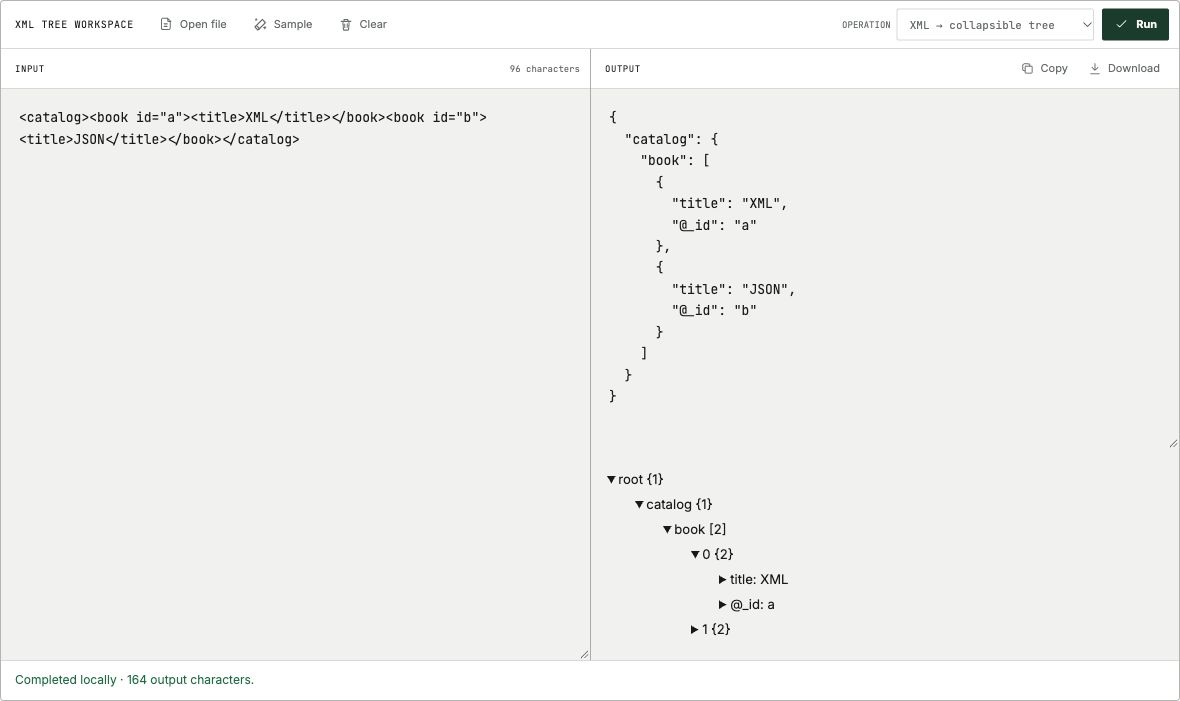
In KitLumi’s parsed tree, an attribute uses the @_ prefix. Repeated child elements become array entries. In the example below, catalog contains two book entries, and the first book has an @_id attribute with the value a.
<catalog><book id="a"><title>XML</title></book><book id="b"><title>JSON</title></book></catalog>

Parsed paths:
catalog.book[0]["@_id"] = "a"
catalog.book[1].title = "JSON"
When should you use an XML formatter instead?
Use the tree viewer to browse parent-child relationships and inspect attributes. Use the XML Formatter when you want indented XML source that keeps XML syntax visible. A JSON representation is a parser-specific view, not an exact replacement for the original document.
What does the XML tree not preserve exactly?
The generic object tree is not a lossless XML editor. Mixed text and elements, comments, namespace meaning, processing instructions, and lexical formatting need review in the original XML. The viewer does not establish XSD validity or prove that a document meets an application schema.
What do attributes, namespaces and mixed text become?
These three examples were checked on 2026-10-15 with fast-xml-parser 5.11.1, using the same options as this viewer. They show the parsed object, not a lossless XML round trip.
In the namespace example, m:note and @_xmlns:m remain literal keys. In the mixed-text example, #text becomes Beforeafterend.; the original spaces and the positions of b and i among text fragments are not preserved. Keep the source for document processing that depends on those details.
Attributes and repeated children
Input
<catalog><book id="a"><title>XML</title></book><book id="b"><title>JSON</title></book></catalog>Actual output
{
  "catalog": {
    "book": [
      {
        "title": "XML",
        "@_id": "a"
      },
      {
        "title": "JSON",
        "@_id": "b"
      }
    ]
  }
}
Namespace prefix and declaration
Input
<m:note xmlns:m="urn:kitlumi:example" m:id="7"><m:title>XML</m:title></m:note>Actual output
{
  "m:note": {
    "m:title": "XML",
    "@_xmlns:m": "urn:kitlumi:example",
    "@_m:id": "7"
  }
}
Mixed text loses interleaving in an object
Input
<p>Before <b>bold</b> after <i>italic</i> end.</p>Actual output
{
  "p": {
    "b": "bold",
    "i": "italic",
    "#text": "Beforeafterend."
  }
}
What can go wrong?
| Problem | What to try |
|---|---|
| Mismatched or missing closing tag | Match each opening tag with its closing tag, including capitalization, and try again. |
| An ampersand causes a parse error | Use & for a literal ampersand in XML text. Do not blindly replace ampersands that already begin valid entity references. |
| An element appears as an array | Check for repeated sibling names. The parsed representation groups repeated elements into entries. |
| The tree differs from the source layout | Keep the original XML. Use the formatter for source inspection; the tree represents parsed data rather than every markup detail. |
Frequently asked questions
Does the XML viewer validate an XSD schema?
No. The viewer parses XML for inspection. It does not validate against an XSD schema.
Can I inspect SOAP or RSS XML?
You can paste XML from those formats. The tree shows the parsed structure; it does not send SOAP requests or fetch a remote feed.
References
Added downloadable XML and actual JSON for attributes, repeated siblings, namespaces and mixed text, plus a tree walkthrough screenshot.
First published .